

Two months ago I joined Confluent’s Stream Processing and Analytics team, where I’ve been working on bringing AI models to real-time data streams.
One of the first problems we encountered seemed surprisingly simple: buffering.
Many AI models work better when you send them several records at once. But Flink processes an unbounded stream of events, and collecting those events into batches introduces some interesting problems around state, ordering, and time.
The Problem
Say we run a help centre for a few hundred customers, and every time an article is created or edited, the change is published to a Kafka Topic:
| tenant_id | doc_id | title | body | updated_at |
|---|---|---|---|---|
| acme | 42 | Resetting a password | … | 10:00:00 |
| acme | 17 | Exporting invoices | … | 10:00:01 |
| globex | 8 | Inviting your team | … | 10:00:01 |
| acme | 42 | Resetting a password | … | 10:00:03 |
We want an embedding for every article, kept up to date as articles change. Embedding APIs take a list, and sending fifty articles in one buffered request takes about as long as sending one. If you run the model yourself, it costs about the same too. Most providers also rate-limit by request. So we want to buffer.
Article 42 shows up twice: someone fixed a typo three seconds after publishing. Whatever stores the embeddings has to end up with the 10:00:03 version. So order matters, and edits don’t always arrive in the order they happened.
Why Not Just Use SQL?
A regular User Defined Function (UDF) gets one row and returns one value, so it can only send one article at a time. A table function can return several rows for each input row, but Flink keeps no state for it between calls, so it can’t hold articles until it has fifty.
An aggregate in an OVER window almost works. It keeps an accumulator per tenant, and OVER (PARTITION BY tenant_id ORDER BY updated_at) even sorts rows by time. Keep the last fifty articles in the accumulator, and call the API on every fiftieth row.
The catch is that an OVER window returns exactly one result per row, as that row goes by. You have fifty embeddings and one slot, so you pack them all in:
SELECT tenant_id, doc_id, updated_at,
       EMBED_BATCH(body) OVER (PARTITION BY tenant_id ORDER BY updated_at) AS embeddings
FROM articles;| row | tenant_id | doc_id | updated_at | embeddings |
|---|---|---|---|---|
| 1 | acme | 42 | 10:00:00 | NULL |
| 2 | acme | 17 | 10:00:01 | NULL |
| … | NULL | |||
| 50 | acme | 93 | 10:00:25 | [[0.012, -0.044, ...], ... ×50] |
| 51 | acme | 61 | 10:00:26 | NULL |
This works and it makes the right number of requests, but forty-nine articles in each batch go out with no embedding and every 50th row needs custom logic to unpack the result. Instead of NULL, you could repeat the last list on every row until the next call to make the parsing easier, but the data shape is a mess. (That’s what ours did, and it’s no easier to read.) We built exactly this for the time-series model, and then took it out. You can’t fix it inside the aggregate, because the problem is the shape: one row in, one row out. We want 49 rows in, nothing out, one request, then fifty rows out, each with its own embedding.
So What is a Process Table Function (PTF)?
A PTF is a Java class you call in the FROM clause, where a table name would normally go. You pass it a table, and Flink feeds it that table’s rows one at a time. With PARTITION BY, rows with the same key get bucketed together, and each key gets its own state. Whatever rows it emits become a new table. It can set timers that call it back later, and emit as many or as few rows as it wants, whenever it wants. PTFs are effectively the DataStream API KeyedProcessFunction, but PTFs are callable from SQL.
Here’s how we can use a PTF from SQL:
CREATE TABLE articles (
  tenant_id  STRING,
  doc_id     STRING,
  title      STRING,
  body       STRING,
  updated_at TIMESTAMP(3),
  WATERMARK FOR updated_at AS updated_at - INTERVAL '5' SECOND
);

SELECT *
FROM EMBED_IN_BATCHES(
  input   => TABLE articles PARTITION BY tenant_id,
  on_time => DESCRIPTOR(updated_at)
);
PARTITION BY tenant_id splits the table by tenant: each tenant’s rows are handled together, with their own state and timers. on_time is the event-time column, which is what makes timers available.
What comes out is one row per article:
| tenant_id | doc_id | updated_at | title | embedding | rowtime |
|---|---|---|---|---|---|
| acme | 17 | 10:00:01 | Exporting invoices | [0.031, -0.008, ...] | 10:00:25 |
| acme | 42 | 10:00:03 | Resetting a password | [0.012, -0.044, ...] | 10:00:25 |
| … | |||||
| globex | 8 | 10:00:01 | Inviting your team | [0.027, 0.015, ...] | 10:00:31 |
Notice article 42 appears once, for the newer version, we’ll see why that happens below.
One thing to think about: batches are per key. A big tenant fills a batch of fifty relatively quickly, but a tenant that edits two articles a day never will. Your PARTITION BY key decides both how full batches get and how well the work spreads out.
The Lifecycle
A watermark is Flink saying “I don’t expect any more rows older than this.” Our watermark trails the latest timestamp by five seconds. Once the watermark passes, no earlier events are expected, so that event is safe to put in a batch.
A timer fires when the watermark passes the time you gave it. We use timers to send a batch once it’s full, and to make sure a slow tenant isn’t left waiting forever.
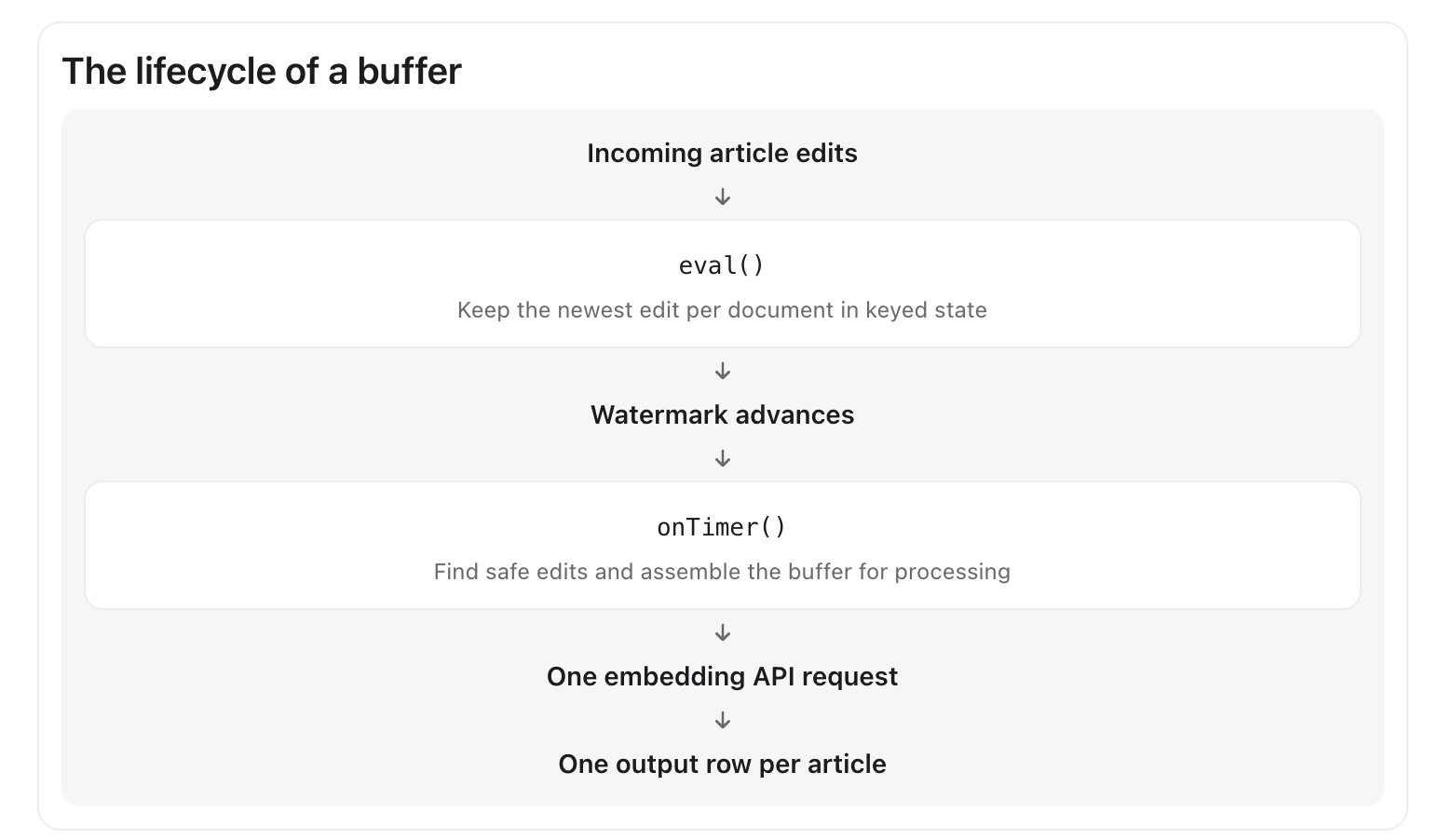
Here is how we actually built our PTF:
Step 1: The Structure
Flink calls eval once per row, and onTimer when a timer fires:
@DataTypeHint(
        "ROW<doc_id STRING, updated_at TIMESTAMP(3), title STRING, embedding ARRAY<FLOAT NOT NULL>>")
public class EmbedInBatches extends ProcessTableFunction<Row> {

    static final int BATCH_SIZE = 50;
    static final Duration MAX_WAIT = Duration.ofSeconds(30);
    static final String BATCH_TIMER = "batch";
    static final String PENDING_TYPE =
            "MAP<STRING, ROW<updated_at TIMESTAMP(3), title STRING, body STRING>>";

    private transient Embedder embedder;
    private transient Counter lateEdits;

    @Override
    public void open(FunctionContext context) {
        embedder = Embedder.connect(context);
        lateEdits = context.getMetricGroup().counter("lateEdits");
    }

    public void eval(
            Context ctx,
            @StateHint(name = "progress", ttl = "7 d") Progress progress,
            @StateHint(name = "pending", ttl = "7 d", type = @DataTypeHint(PENDING_TYPE))
                    MapView<String, Row> pending,
            @ArgumentHint({SET_SEMANTIC_TABLE, REQUIRE_ON_TIME}) Row input)
            throws Exception { ... }

    public void onTimer(OnTimerContext ctx, Progress progress, MapView<String, Row> pending)
            throws Exception { ... }
}
Embedder is your embedding provider’s client; it isn’t part of Flink. It takes a list of strings and returns one vector per string, in order: List<float[]> embed(List<String> texts).
The class-level @DataTypeHint is what we emit; Flink adds the PARTITION BY column in front and rowtime at the end. SET_SEMANTIC_TABLE is what gives us state and timers, and REQUIRE_ON_TIME makes the query fail if there’s no event time. Each @StateHint parameter is state that Flink loads before each call and saves after. onTimer takes the same state, in the same order.
Step 2: State
The first piece is bookkeeping:
public static class Progress {
    public int pendingCount;
    public LocalDateTime nextTimer;
    public LocalDateTime watermark;
}
pendingCount is how many articles are waiting, so eval can tell when a batch might be full without reading them all. nextTimer is when our timer is due. We’ll cover watermark in step 5.
Flink reads and writes this whole object on every call. That’s fine for a few fields, but not for large article bodies. For those we use a MapView, whose entries live in Flink’s state backend and are read and written one at a time. Adding an article is one write, however many are waiting.
The map is keyed by doc_id, with the edit time, title and body as the value. That has a nice side effect: if article 42 is edited twice before its batch goes, the newer edit replaces the older one, and we only pay to embed it once.
Step 3: Eval
public void eval(
        Context ctx,
        @StateHint(name = "progress", ttl = "7 d") Progress progress,
        @StateHint(name = "pending", ttl = "7 d", type = @DataTypeHint(PENDING_TYPE))
                MapView<String, Row> pending,
        @ArgumentHint({SET_SEMANTIC_TABLE, REQUIRE_ON_TIME}) Row input)
        throws Exception {
    TimeContext<LocalDateTime> time = ctx.timeContext(LocalDateTime.class);
    LocalDateTime ts = time.time();
    LocalDateTime watermark = advanceWatermark(progress, time.currentWatermark());

    if (watermark != null && !ts.isAfter(watermark)) {
        lateEdits.inc();
        return;
    }

    String docId = input.getFieldAs("doc_id");
    Row waiting = pending.get(docId);
    if (waiting != null && !ts.isAfter(waiting.getFieldAs(0))) {
        return; // a newer edit of this article is already waiting
    }
    pending.put(docId, Row.of(ts, input.getFieldAs("title"), input.getFieldAs("body")));
    if (waiting == null) {
        progress.pendingCount++;
    }

    // Wake up when this edit completes a batch, or when it has waited MAX_WAIT.
    LocalDateTime wakeUp = progress.pendingCount >= BATCH_SIZE ? ts : ts.plus(MAX_WAIT);
    if (progress.nextTimer == null || wakeUp.isBefore(progress.nextTimer)) {
        progress.nextTimer = wakeUp;
        time.registerOnTime(BATCH_TIMER, wakeUp);
    }
}
eval never emits anything.
We drop late edits (step 5), then buffer this edit unless a newer one for the same article is already waiting. Edits can arrive out of order, and the older one should never win.
The watermark and the timer do different jobs here. The passing of the watermark determines that it is safe to send and event (an edit only goes out once the watermark has passed it). The timer decides when to check. We want to send events in two cases:
- A batch is full. When the 50th article arrives, we set the timer for that article’s time. We don’t send right away, because an older edit could still be on its way. Once the watermark reaches the 50th article’s time, all fifty are safe.
- A batch has waited too long. The first article into an empty buffer sets the timer for its time plus
MAX_WAIT. This handles slow streams, so we’re not waiting forever.
The timer is named, so each tenant has only one. Registering a named timer again replaces it, so we only ever move it earlier. When rows arrive in order, that means the timer is set twice per batch: once by the first article and once by the fiftieth. An out-of-order edit can pull it earlier than it needs to be. That’s fine; onTimer works out exactly when to wake up next.
Step 4: onTimer
This is where we perform the embedding:
record Waiting(String docId, LocalDateTime updatedAt, String title, String body) {}

public void onTimer(OnTimerContext ctx, Progress progress, MapView<String, Row> pending)
        throws Exception {
    TimeContext<LocalDateTime> time = ctx.timeContext(LocalDateTime.class);
    LocalDateTime watermark = advanceWatermark(progress, time.currentWatermark());

    // Everything waiting, oldest first.
    List<Waiting> waiting = new ArrayList<>();
    for (Map.Entry<String, Row> e : pending.entries()) {
        Row row = e.getValue();
        waiting.add(new Waiting(e.getKey(), row.getFieldAs(0), row.getFieldAs(1), row.getFieldAs(2)));
    }
    waiting.sort(Comparator.comparing(Waiting::updatedAt));

    // The watermark decides what's safe to send: the edits it has passed.
    int safe = 0;
    while (safe < waiting.size() && !waiting.get(safe).updatedAt().isAfter(watermark)) {
        safe++;
    }

    // Send every full batch of safe edits.
    int sent = 0;
    while (safe - sent >= BATCH_SIZE) {
        embedAndEmit(waiting.subList(sent, sent + BATCH_SIZE), pending);
        sent += BATCH_SIZE;
    }

    // Send the safe leftovers too, if the oldest has waited MAX_WAIT.
    if (sent < safe && !waiting.get(sent).updatedAt().plus(MAX_WAIT).isAfter(watermark)) {
        embedAndEmit(waiting.subList(sent, safe), pending);
        sent = safe;
    }

    // Wake up for the next full batch or the next deadline, whichever comes first.
    List<Waiting> left = waiting.subList(sent, waiting.size());
    progress.pendingCount = left.size();
    LocalDateTime fullBatch =
            left.size() >= BATCH_SIZE ? left.get(BATCH_SIZE - 1).updatedAt() : null;
    LocalDateTime deadline = left.isEmpty() ? null : left.get(0).updatedAt().plus(MAX_WAIT);
    progress.nextTimer = earliest(fullBatch, deadline); // the earlier of the two, ignoring nulls
    if (progress.nextTimer == null) {
        time.clearTimer(BATCH_TIMER);
    } else {
        time.registerOnTime(BATCH_TIMER, progress.nextTimer);
    }
}

private void embedAndEmit(List<Waiting> batch, MapView<String, Row> pending) throws Exception {
    List<String> texts = new ArrayList<>();
    for (Waiting w : batch) {
        texts.add(w.title() + "\n\n" + w.body());
    }
    List<float[]> vectors = embedder.embed(texts);
    for (int i = 0; i < batch.size(); i++) {
        Waiting w = batch.get(i);
        collect(Row.of(w.docId(), w.updatedAt(), w.title(), vectors.get(i)));
        pending.remove(w.docId());
    }
}
embedAndEmit is what the OVER aggregate couldn’t do. One buffered request, and one row out per article, each with its own embedding.
The rest of onTimer works out what gets buffered together. A MapView has no order, so we read everything waiting and sort it. The events the watermark has passed are safe. We send every full batch of those. Safe leftovers wait for more, unless the oldest has waited MAX_WAIT, in which case they go as a smaller batch.
Then we set the timer the same way eval does, because now we can see every waiting article: the time of the article that completes the next batch, or the oldest article’s deadline, whichever comes first. If nothing is waiting, we clear it. So the timer goes off about once per batch, not once per article.
A few things I learned here:
- Work from the watermark, not the timer’s time. The watermark can jump a long way at once, say after a source was idle. By the time a 10:00:01 timer fires, hundreds of edits might be ready, which is why we loop.
rowtimeis the timer’s time, shared by the whole batch. That’s whyupdated_atis its own column.- Don’t re-register a timer in the past from
onTimer. It fires again immediately, forever. Here the next timer is always after the watermark: we’ve already sent every full batch and every overdue leftover the watermark allows.
Step 5: Late Edits and the Restart Bug
An edit is late if it’s at or before the watermark. Flink doesn’t drop these for you; a PTF sees every row, and it’s up to you.
For us, a late edit is dangerous. If the 10:00:03 version of article 42 has already gone out and the 10:00:00 version finally turns up, embedding it would overwrite the newer embedding downstream, so we drop it and count it. If that counter climbs, your watermark is too tight.
So why keep our own copy of the watermark?
static LocalDateTime advanceWatermark(Progress progress, LocalDateTime current) {
    if (current != null && (progress.watermark == null || current.isAfter(progress.watermark))) {
        progress.watermark = current;
    }
    return progress.watermark;
}
Watermarks aren’t saved in checkpoints. After a restart, your state comes back but the watermark starts at null. For a little while, every edit looks on time, including that stale 10:00:00 version, and it overwrites the newer one. Keeping the highest watermark in state fixes it, because state survives the restart. This is the bug that bit us hardest and not easily caught by tests.
Step 6: Keeping Your Columns
Flink has an argument trait, PASS_COLUMNS_THROUGH, that copies input columns to the output for you. It doesn’t work with timers, and it couldn’t: when onTimer emits a batch, there’s no “current row” to copy from. Those fifty articles arrived in fifty different calls.
So any column you want in the output has to wait in state. This example keeps title, to return it, and body, because the request needs it, but doesn’t return body. Without returning the input columns, the user would have to join the results back to the input, which is often expensive on a stream. The trade-off is that every column you keep is stored as state.
A function that keeps whatever columns the caller’s table has is more complicated, because the types aren’t known until the query is planned. We ended up storing each row’s columns as bytes. That’s probably a post of its own.
Step 7: State That Outlives Your Code
State is saved in checkpoints and savepoints, so a restarted job picks up where it left off. Changing your code without losing that state is a challenge:
- State names are part of the saved format. Flink stores state by name, which defaults to the parameter name. Rename the parameter without an explicit name, and a restored job won’t find its state: every waiting article is lost. That’s why our hints set
name. - Changing a state class can break restores. For anything long-lived, consider storing a
byte[]with your own versioned serializer, so a new field is just a new version. - Clean up.
ttl = "7 d"drops a tenant’s state after a week without being written. For aMapView, it applies per entry, so an article stuck for a week goes too, quietly. Count it if that matters.
Testing it
Unit tests that call eval and onTimer directly, with a fake Embedder, are good for the small rules. Integration tests with real SQL should cover:
- Fifty ready articles make one request and fifty correct rows.
- An article edited twice is embedded once, for the newer version, even if the edits arrive out of order.
- A quiet tenant’s batch is flushed once other tenants move the watermark past its deadline.
- A late edit is dropped and counted.
Then, once it’s in use, a restore test: take a savepoint, start the current code from it, and check the output. Flink’s own tests have a harness for this. It’s the only test that catches the bugs in steps 5 and 7, and next time I’d write it first.
Summary
The PTF API is small. Most of the work, and nearly all of the bugs we encountered, came down to state and timers: when an edit is safe to send, when a timer should fire, and what happens to the watermark after a restart.